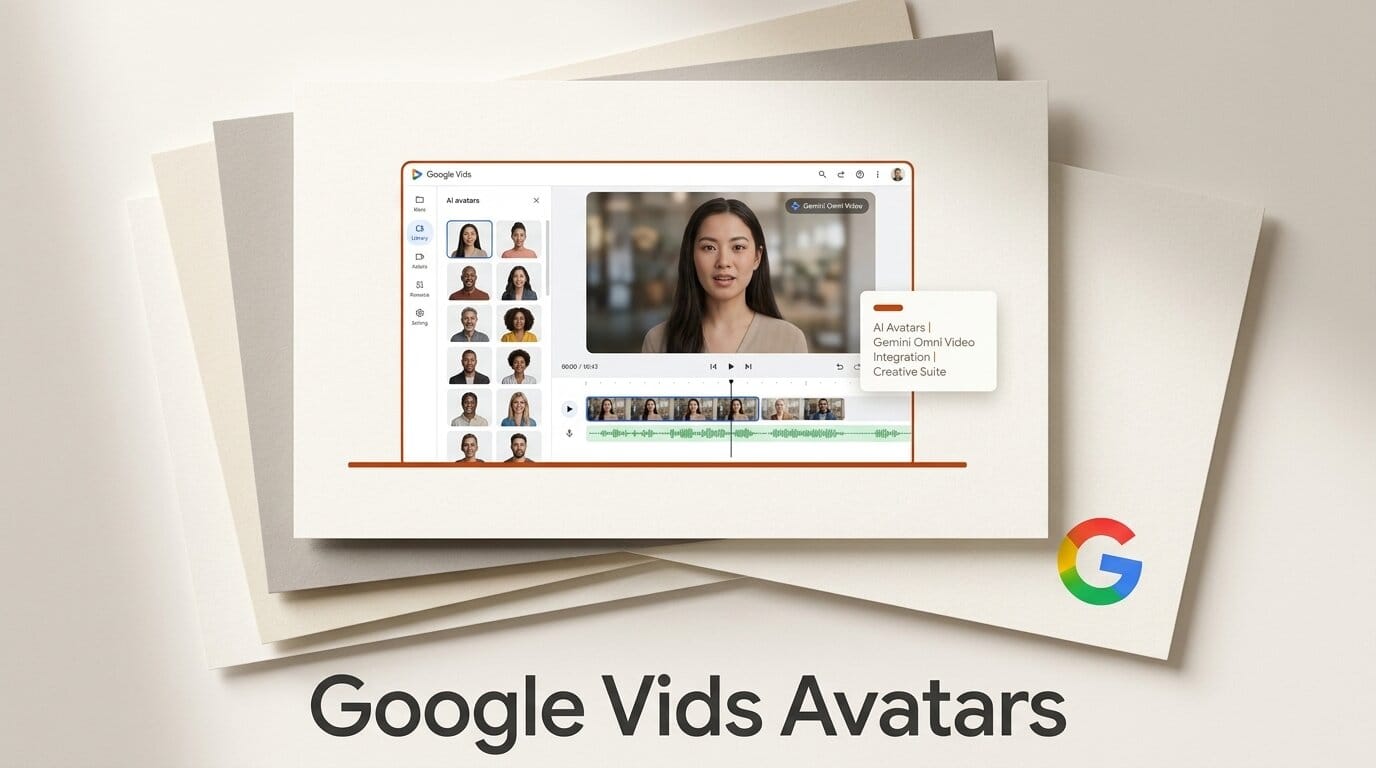
Google is turning Google Vids into an AI video studio. On July 16, 2026, the company added two features to its Workspace video tool: Gemini Omni for text-to-video generation and editing, and Personal Avatars, a talking-head system that lets you upload one selfie and a short voice recording, then type a script your on-screen double delivers to camera. Every AI-generated clip carries an invisible SynthID watermark, and the features roll out to Google AI Pro and Ultra subscribers plus Google Workspace business customers.
The headline is the avatar. Until now, putting a presenter on screen meant filming yourself. Personal Avatars removes the camera entirely: write the words, pick your likeness, and Vids renders the delivery. That puts Google directly against dedicated avatar platforms like HeyGen and Synthesia, only now the feature lives inside the same suite where teams already build slides and docs.
What Google Added to Vids
There are two distinct capabilities, and it helps to keep them separate. Gemini Omni is the generation and editing engine. Personal Avatars is a presenter layer that sits on top of it. Both are new to Google Vids as of July 16, and both are gated behind paid tiers.
- Gemini Omni: Describe the video you want in plain language, optionally attach image references, and Vids generates the clip. You then refine it with step-by-step edits, swapping backgrounds or fixing lighting, without regenerating from scratch.
- Personal Avatars: Upload a selfie and a voice sample once. From then on, type any message and your avatar delivers it on camera in your likeness and voice. No filming, no re-shoots.
- SynthID provenance: Every AI clip is stamped with an invisible SynthID watermark so the output is identifiable as AI-generated.
How Personal Avatars Work
The setup is deliberately light. You provide a single selfie for the likeness and a short voice recording for the voice model. Vids builds a reusable avatar tied to your individual account. After that, producing a video is a writing task: paste your script, and the avatar speaks it to camera. Because the avatar is a fixed asset, you can update a video by editing the words rather than re-recording, which is the entire point for anyone who ships explainer content on a schedule.
Google is fencing the feature carefully. Personal Avatars are limited to users 18 and older, restricted to certain regions at launch, and locked to the account that created them, so you cannot generate an avatar of someone else from a stray photo. That consent-and-identity framing, paired with the SynthID watermark, is Google's answer to the deepfake concern that shadows every avatar product.
Gemini Omni Video Generation in Vids
Gemini Omni is the same model family Google has been threading through its consumer apps: it powers the Google Photos Video Remix feature and the Android 17 conversational video editing tools. In Vids, it handles both first-draft generation from a prompt and conversational refinement afterward. This sits alongside Veo 3.1, which Google rolled into Vids back in February for general video generation, so the suite now has both a cinematic generator and a conversational editor under one roof.
Google Vids Avatars vs HeyGen vs Synthesia
The avatar category is not new, but Google's distribution is. Here is how the three stack up for a creator deciding where to build talking-head content.
| Factor | Google Vids Personal Avatars | HeyGen | Synthesia |
|---|---|---|---|
| Avatar input | One selfie plus a voice sample | Photo or video footage | Photo or studio-recorded video |
| Lives inside | Google Workspace (Vids) | Standalone platform | Standalone platform |
| AI video generation | Yes, Gemini Omni and Veo 3.1 | Yes | Yes |
| Provenance watermark | SynthID on every clip | Platform-dependent | Platform-dependent |
| Best for | Teams already in Workspace | Marketing and social video | Corporate training at scale |
| Access | AI Pro, Ultra, Workspace business | Free tier plus paid plans | Paid plans |
Google's edge is not the avatar quality, which the incumbents have refined for years, but the fact that the avatar is one click from the slides, docs, and Meet recordings a team already produces. For a Workspace shop, that removes an entire tool from the stack.
How to Create an Avatar Video in Google Vids
- Open Vids at vids.new with a Google AI Pro, Ultra, or eligible Workspace business account.
- Create your Personal Avatar: upload a clear selfie and record a short voice sample when prompted.
- Start a new video and add an avatar scene, then paste the script you want delivered to camera.
- Use Gemini Omni to generate any supporting b-roll from a text prompt and reference images.
- Refine with step-by-step edits, swapping backgrounds or adjusting lighting without regenerating.
- Export. The clip ships with an invisible SynthID watermark identifying it as AI-generated.
What This Enables for Creators
The practical unlock is speed on repeatable formats. If you produce weekly updates, onboarding clips, product explainers, or localized versions of the same message, the avatar collapses a filming-and-editing cycle into a writing-and-review cycle. Update a figure in the script, regenerate, done, without lighting a set or re-recording narration. Pair that with Gemini Omni generating the surrounding visuals and a small team can ship a volume of video that used to require a studio. The tradeoff is authenticity: an avatar reads as an avatar, so keep it for utility content and keep your real face for anything that trades on personal connection. Start with one recurring format, measure whether viewers finish it, and expand from there.
Frequently Asked Questions
What is Google Vids?
Google Vids is the video creation app in Google Workspace, alongside Docs, Sheets, and Slides. As of July 16, 2026 it includes Gemini Omni AI video generation and Personal Avatars.
What are Personal Avatars in Google Vids?
Personal Avatars let you upload one selfie and a short voice sample to create a digital version of yourself. You then type a script and the avatar delivers it on camera, no filming required.
How much does it cost?
The features are available to Google AI Pro and Ultra subscribers and to Google Workspace business customers. There is no free access at launch. See Google's AI plans and Workspace business pages for tiers.
Are the AI videos watermarked?
Yes. Every AI-generated clip carries an invisible SynthID watermark so the output can be identified as AI-generated, part of Google's provenance and anti-deepfake safeguards.
Can I make an avatar of someone else?
No. Personal Avatars are tied to your individual account and limited to users 18 and older in certain regions, so you cannot generate an avatar from someone else's photo.
How does this compare to HeyGen and Synthesia?
HeyGen and Synthesia are dedicated avatar platforms with years of refinement. Google's advantage is distribution: the avatar lives inside Workspace next to the docs and slides teams already use, removing a separate tool from the workflow.





