The MacBook Pro M5 Max can run a 70-billion parameter language model at 18 to 25 tokens per second, generate a FLUX image 3.8 times faster than its predecessor, and fit everything in 128GB of unified memory without offloading to the CPU. For creators who have been renting cloud GPU time or waiting for NVIDIA restocks, the calculus just shifted.
Apple released the M5 Pro and M5 Max MacBook Pro on March 11, 2026. The raw numbers are significant, but the deeper story is about what they unlock: local AI workflows that are fast enough, large enough, and quiet enough to replace cloud dependencies for a growing set of creative tasks.
Background
Apple has been building toward this moment since the M1 launched in 2020. Each generation of Apple Silicon increased unified memory capacity and bandwidth, but the bottleneck was always the same: memory bandwidth limited how fast you could feed data to the Neural Engine and GPU.
The M4 Max topped out at 96GB of unified memory with 546GB/s bandwidth. That was enough to run some quantized language models and small diffusion models, but the experience was marginal. A 70B model would barely fit, and inference was slow enough to make the workflow impractical for anything beyond experimentation.
The M5 generation changes the constraints. The M5 Max pushes unified memory to 128GB at 614GB/s bandwidth, a 32GB and 12% bandwidth increase that sounds incremental but crosses critical thresholds for model sizes that actually matter. More importantly, the M5 introduces Neural Accelerators embedded in every GPU core. The M5 Max has 40 GPU cores, meaning 40 Neural Accelerators working alongside the standard 16-core Neural Engine.
Deep Analysis
The Fusion Architecture: Neural Accelerators in Every Core
The M5 Pro and M5 Max are built on Apple's new Fusion Architecture, connecting two 3nm dies with an 18-core CPU (6 super cores, 12 performance cores). But the real story is the GPU.
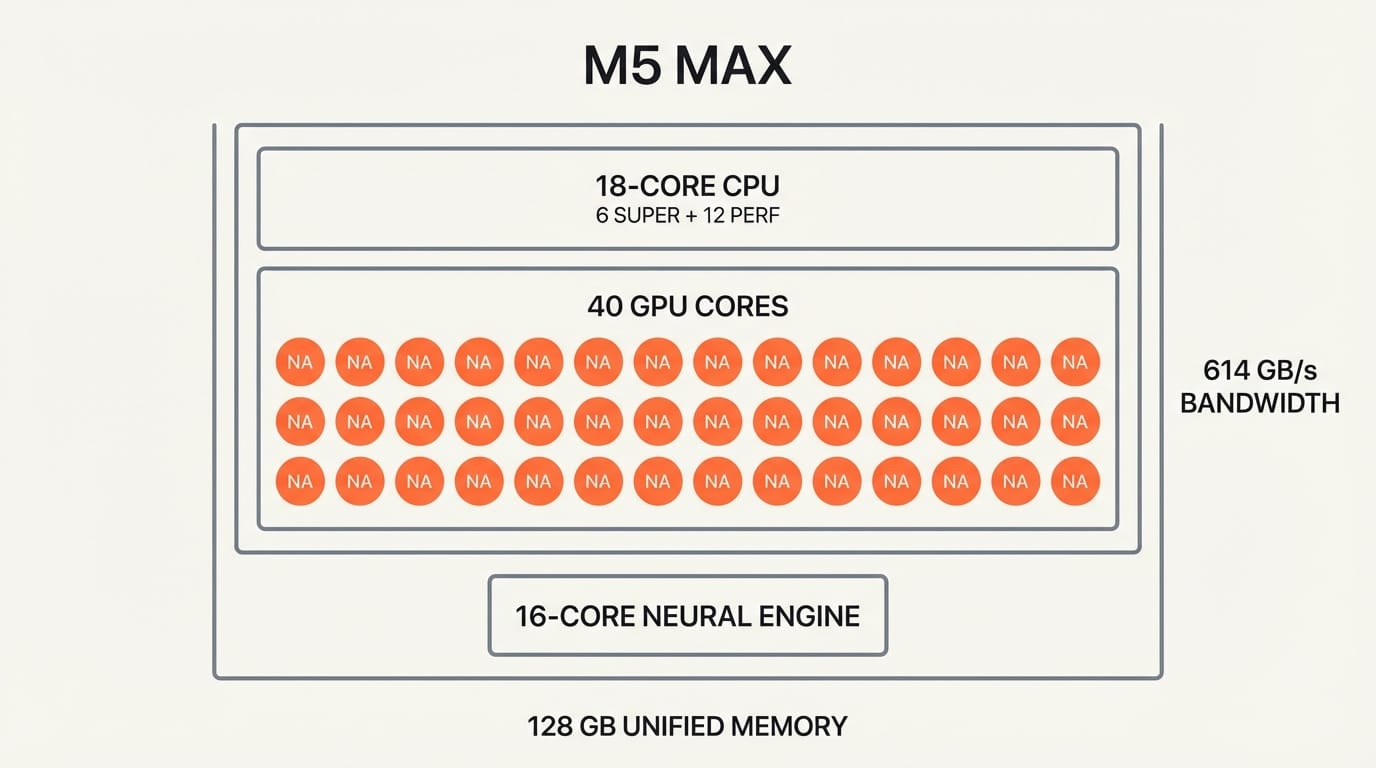
Previous Apple Silicon chips relied on a dedicated Neural Engine for AI workloads. The M5 adds Neural Accelerators directly inside each GPU core, creating a distributed inference architecture. The M5 Max's 40 GPU cores each contain a Neural Accelerator, so AI workloads can leverage the full GPU array rather than waiting for the Neural Engine alone.
The result: over 4x the peak GPU compute for AI versus the M4 generation, and over 6x versus M1. Apple's MLX framework, its open-source machine learning library optimized for Apple Silicon, runs 20 to 30 percent faster than llama.cpp and up to 50 percent faster than Ollama on the same hardware. That software optimization stacks on top of the hardware gains.
Local AI Inference: From Possible to Practical
The M5 Max with 128GB unified memory represents a threshold crossing for local AI. Here is where the numbers land in practice.
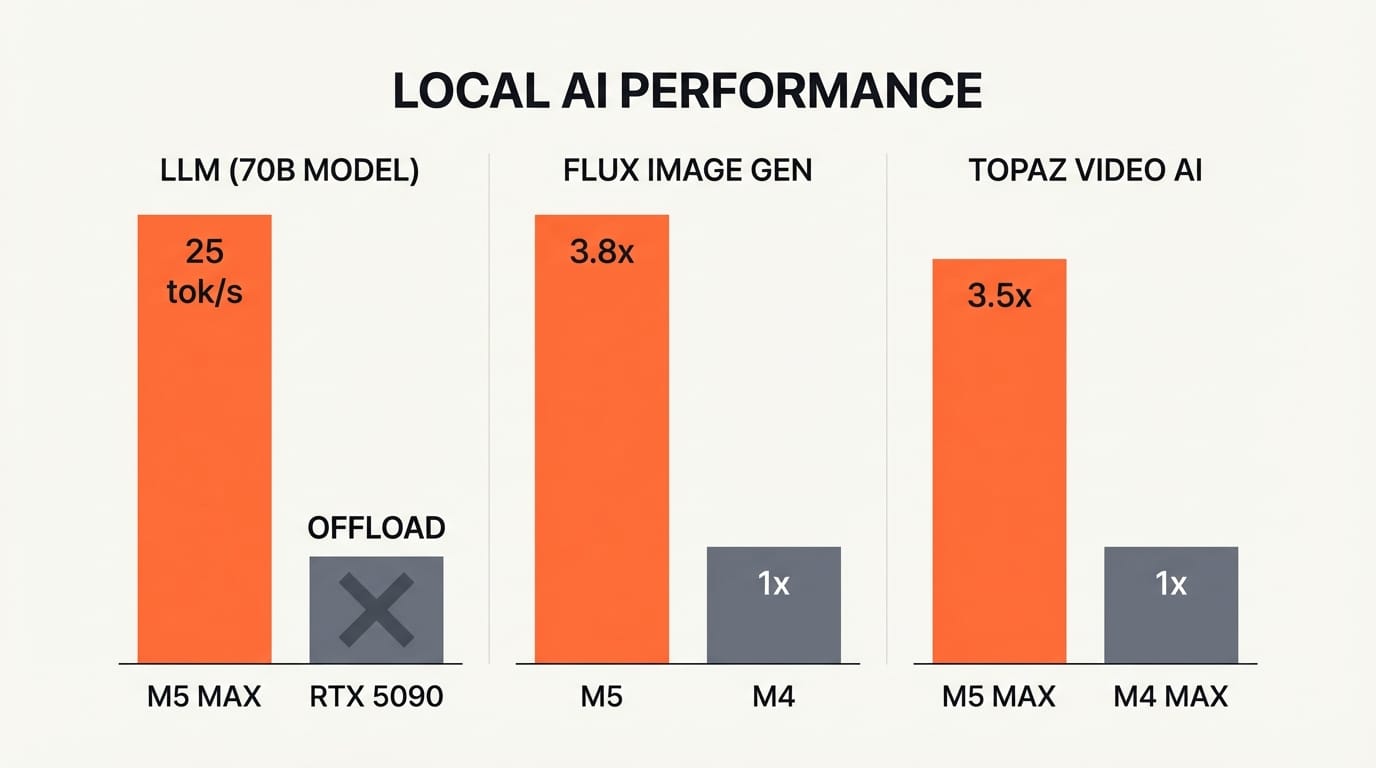
For language models, a 70B Q4_K_M quantized model fits entirely in memory without CPU offloading, running at 18 to 25 tokens per second. That is fast enough for interactive use: real-time writing assistance, code generation, or content drafting without sending a single prompt to the cloud. LLM prompt processing is 3.9 times faster than on M4 Pro, and 6.9 times faster than M1 Pro.
For image generation, the gains are even sharper. Generating a 1024x1024 FLUX-dev-4bit image (12B parameters) through MLX is 3.8 times faster on M5 than on M4. Tools like Draw Things, MFLUX, and DiffusionKit now run Stable Diffusion 3.5 and FLUX models locally with response times that rival cloud APIs.
For video, Topaz Video AI runs 3.5 times faster on M5 Max versus M4 Max, and DaVinci Resolve is 3 times faster for AI-accelerated tasks. Maxon Redshift renders 5.2 times faster on M5 Pro versus M1 Pro.
The comparison with NVIDIA is instructive. An RTX 5090 is still faster for raw throughput on small models (7B), hitting 186 to 213 tokens per second. But the M5 Max wins on large models because unified memory means the entire model stays in fast memory. The RTX 5090 cannot load a 70B model into its 32GB VRAM without offloading to system RAM, which destroys performance. The M5 Max handles it natively.
The Cloud-Free Creative Workflow
The financial argument for local AI is straightforward. Cloud GPU instances for creative AI workloads typically cost $1 to $4 per hour. A creator running Stable Diffusion or LLM inference for four hours daily spends $120 to $480 per month on cloud compute. Over the three-year lifecycle of a MacBook Pro, that totals $4,320 to $17,280 in cloud costs.
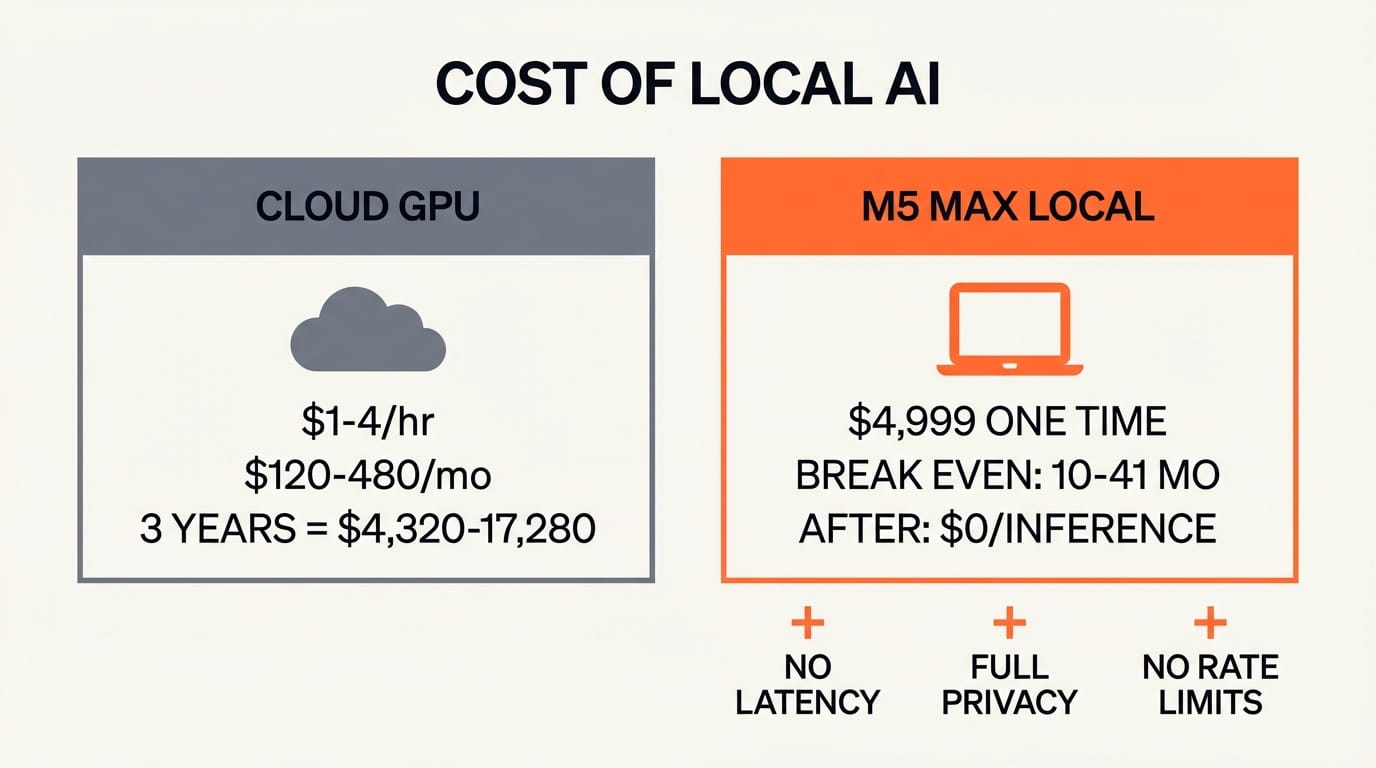
A MacBook Pro M5 Max with 128GB starts at approximately $4,999. The local hardware pays for itself within 10 to 41 months depending on cloud usage intensity, and the cost of inference after that is zero.
But the financial case is secondary to the workflow case. Local inference means no upload latency for large files. No data leaving your machine, which matters for client work under NDA or unreleased creative projects. No rate limits during crunch periods. No outages when your cloud provider has a bad day.
For video editors, the combination of fast local AI (noise reduction, upscaling, motion estimation) with 128GB of unified memory means you can keep your timeline, AI tools, and source footage all in active memory simultaneously. There is no swap penalty, no waiting for data to shuttle between VRAM and system RAM.
For photographers and digital artists, running FLUX or Stable Diffusion locally with DiffusionKit means generating reference images, style variations, and compositing elements without leaving your editing application. The 3.8x speed improvement makes local generation fast enough to replace cloud APIs in iterative creative workflows.
Impact on Creators
Video editors and motion designers benefit most from the DaVinci Resolve and Topaz Video AI speedups. If AI upscaling or noise reduction is part of your delivery pipeline, a 3x to 3.5x speedup directly reduces project turnaround time. A render that took an hour now takes 20 minutes.
Photographers and digital artists gain the most from local image generation. Running FLUX-dev locally at 3.8x the speed of M4 means generating a batch of 20 reference images takes minutes instead of the better part of an hour. No cloud subscription required.
Content creators and writers who use local LLMs for drafting, research, or editing get interactive performance from 70B models for the first time on a laptop. This is the quality tier where models produce genuinely useful creative writing assistance.
Independent studios and freelancers benefit most from the cost equation. The $120 to $480 monthly cloud savings add up fast, and the privacy of local inference removes friction when working on embargoed or sensitive projects.
The upgrade calculus depends on your current hardware. M1 and M2 users see transformative gains across every metric. M4 users see meaningful but less dramatic improvements, with the biggest jump in AI-specific workloads (3x to 3.8x) rather than general compute.
Key Takeaways
1. The M5 Max with 128GB unified memory at 614GB/s runs 70B language models at 18 to 25 tokens per second, making large local AI genuinely interactive.
2. Neural Accelerators in every GPU core deliver 4x AI compute versus M4, changing the architecture of on-device inference.
3. FLUX image generation is 3.8x faster on M5 versus M4, with Topaz Video AI 3.5x faster and DaVinci Resolve 3x faster.
4. The M5 Max beats the RTX 5090 for large model inference because 128GB unified memory eliminates the VRAM bottleneck.
5. Local AI workflows can replace $4,320 to $17,280 in cloud GPU costs over a MacBook Pro's lifecycle.
What to Watch
WWDC 2026 in June will reveal how deeply Apple integrates these AI capabilities into its creative software. Final Cut Pro, Logic Pro, and the broader developer ecosystem stand to gain significantly from Neural Accelerator APIs. If Apple opens these accelerators to third-party developers with clean APIs, every creative application on macOS becomes an AI application.
For creators, the decision point is now. If your work involves AI-accelerated video, local image generation, or LLM-powered content workflows, the M5 Max is the first laptop that handles all three without compromise. The cloud is not going away, but for the first time, it is optional.
Deep dive by Creative AI News.
Subscribe for free to get the weekly digest every Tuesday.