Figma just handed AI agents the keys to the design canvas. On March 24, 2026, the company launched bidirectional write access through its MCP server, letting nine coding agents create, edit, and modify native Figma components directly. This is not an AI design generator. It is a fundamental shift in who gets to touch the canvas and what design systems are actually for.
Background
Figma's MCP rollout has followed a deliberate three-phase strategy. The company first launched a read-only MCP server in mid-2025, giving AI coding agents access to design file data for code generation. In February 2026, it added a one-directional generate_figma_design tool that could translate HTML and live interfaces into editable Figma layers. The March 24 update completes the loop with the use_figma tool, enabling full bidirectional read-write access to the canvas.
The previous MCP update already connected Figma to AI coding workflows, but agents could only consume design data. Now they can produce it. Nine MCP clients are supported at launch: Claude Code, OpenAI Codex, GitHub Copilot, Cursor, Augment, Copilot CLI, Factory, Firebender, and Warp. The timing is deliberate. Both OpenAI's Codex integration and Anthropic's Claude Code gained canvas write access within days of each other, as Codex crossed one million weekly active users with 400% growth since January 2026.
This launch also arrives one week after Google Stitch expanded its own AI design capabilities with voice canvas and vibe design features. The design tool space is becoming the most contested battleground in the AI agent race, and Figma is responding not by building its own AI generator, but by turning its canvas into shared infrastructure for all of them.
Deep Analysis
The Shared Control Surface Strategy
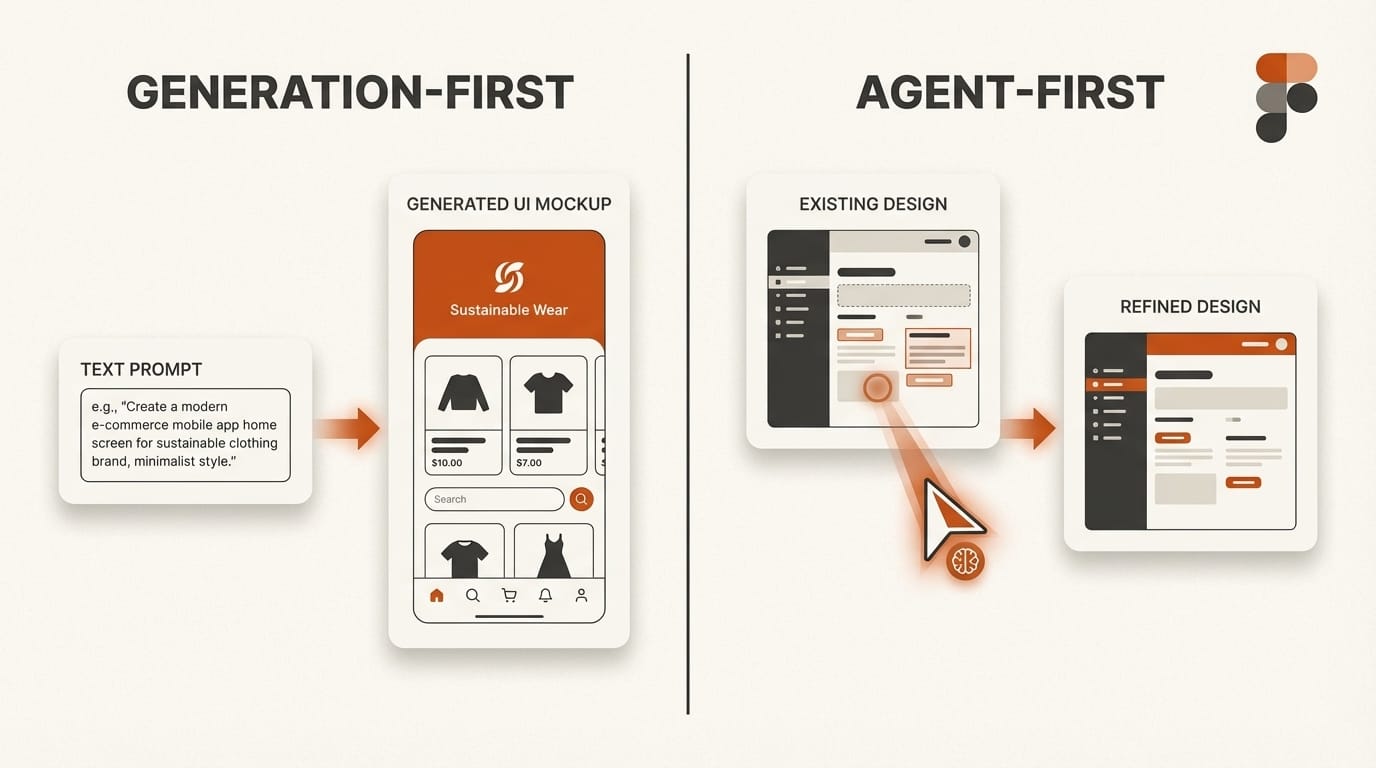
Figma's approach to AI is fundamentally different from Google Stitch's. Where Stitch generates complete UI designs from text or voice prompts, Figma is positioning itself as the neutral canvas where rival AI platforms compete for designer attention. Claude Code, Codex, Copilot, and Cursor are direct competitors in the AI coding market. But all nine of them now agree on one thing: Figma is where designs get built.
This is a platform play, not a product feature. By making the canvas writable to any MCP-compatible agent, Figma avoids the trap of picking a single AI partner and instead becomes the design layer that every agent needs. The strategy mirrors how VS Code became the universal editor by embracing extensions from competing AI providers. Figma is betting that the canvas itself is more valuable than any individual AI's ability to draw on it.
The competitive implications are significant. Google Stitch dominates the zero-to-one ideation phase, generating multiple design concepts in minutes. But Stitch produces disposable prototypes. Figma with AI agents handles the one-to-one-hundred refinement phase: production-ready components linked to real design systems, consistent with existing brand standards, and immediately usable by engineering teams. As Fast Company reported, Figma shares dropped 8.8% on the Stitch announcement, but Figma's response suggests the company sees agents, not generators, as the real threat and opportunity.
Design Systems Become AI Infrastructure
The most consequential aspect of this launch is not the write access itself but what it requires to work well. Agents using the use_figma tool do not generate pixel art. They create native Figma components using real variables, design tokens, and auto layout constraints from the team's existing design system. The quality of an agent's output is directly proportional to the quality of the design system it reads.
This transforms design systems from human documentation into machine-readable infrastructure. A well-organized system with clear naming conventions, consistent token usage, and properly structured components will produce useful agent output. A messy system with inconsistent naming and missing tokens will produce equally messy results. Design system teams now serve two audiences: human designers who reference the system visually, and AI agents who consume it programmatically.
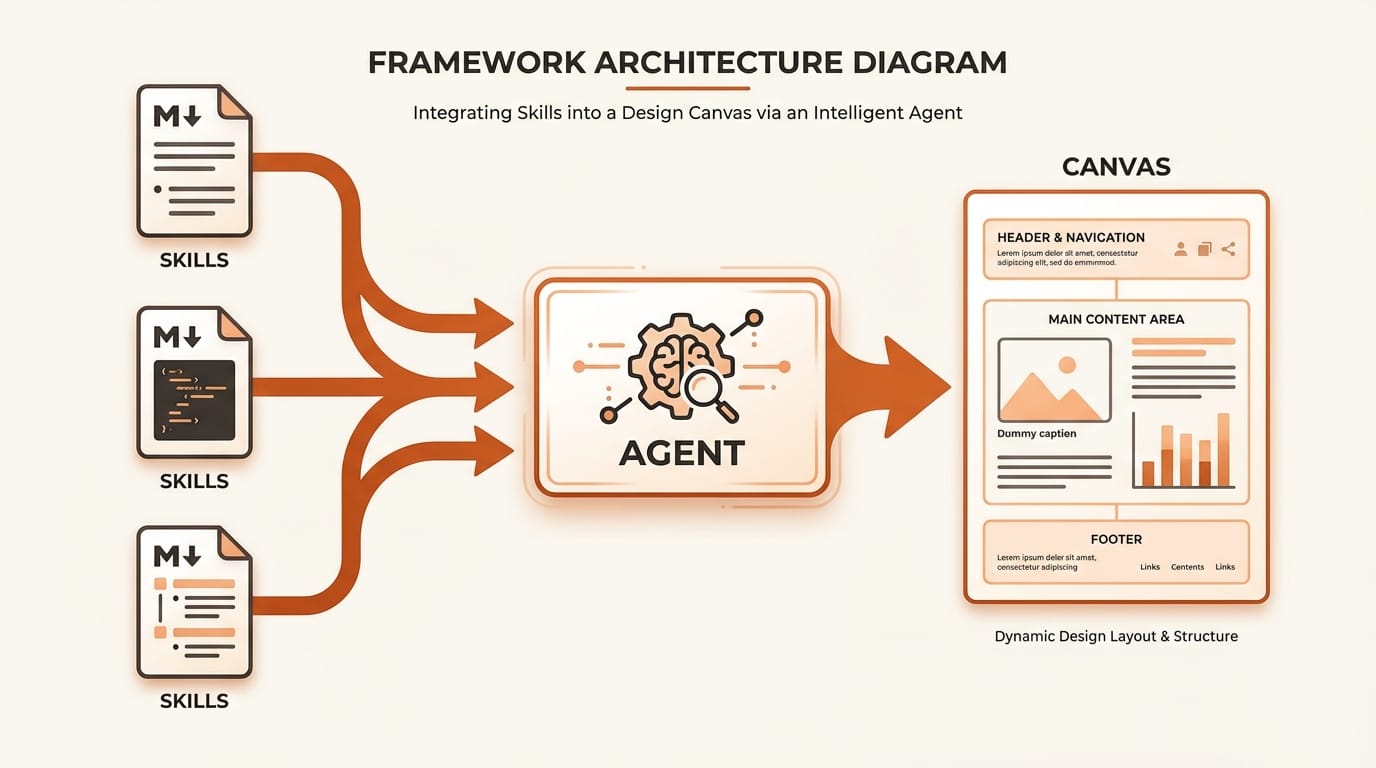
Figma also launched a Skills framework that reinforces this dynamic. Skills are markdown-based instruction files that teach agents how to work within Figma. No plugin development or coding is required. Nine community-built skills shipped at launch, including library generation, Edenspiekermann's design system application skill, and Uber's accessibility screen reader specification skill. Skills encode domain expertise as reusable instructions, letting teams share their design system knowledge in a format that both humans and agents can use.
Uber's Proof of Concept: Weeks to Minutes
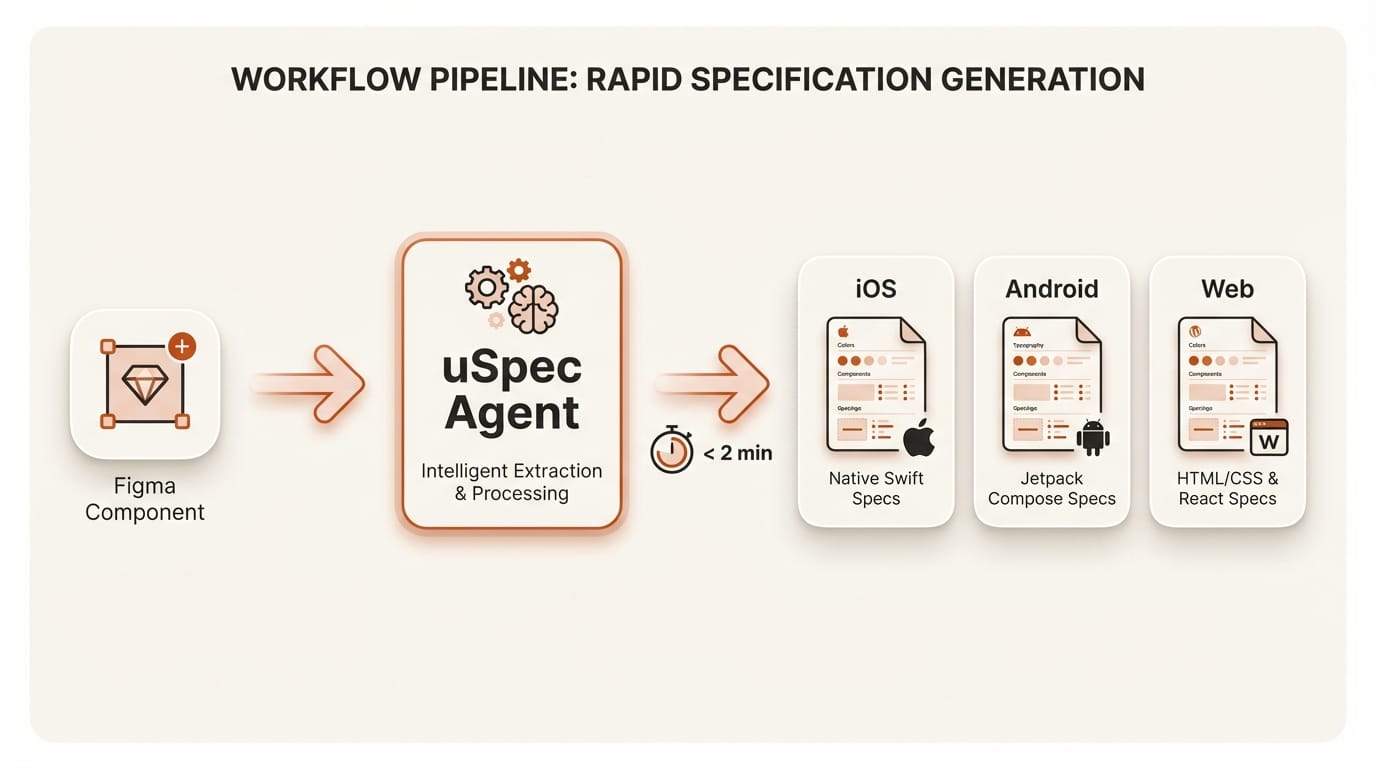
The strongest evidence that this approach works at enterprise scale comes from Uber's uSpec system. Uber's Base design system serves thousands of engineers across seven implementation stacks (UIKit, SwiftUI, Android XML/Compose, Web React, Go, and SDUI). Before agents, a single button component required six documentation sections: anatomy, API, properties, color annotation, structure, and screen reader specifications covering VoiceOver, TalkBack, and ARIA.
Manual spec documentation took weeks and drifted out of date almost immediately. With their agentic system connecting Cursor to Figma through MCP, Uber now generates a complete screen reader specification covering three platforms in under two minutes. The system reads component trees via MCP, extracts design tokens and variant values, and renders finished specs directly in Figma. The entire pipeline runs locally, with no proprietary design data leaving Uber's network.
The accessibility angle is particularly noteworthy. Uber's screen reader skill loads platform-specific reference documentation (VoiceOver modifiers, TalkBack semantics, ARIA roles) before analyzing components, preventing the agent from guessing property names. This is not general-purpose AI producing approximate specs. It is domain-specific AI producing precise, standards-compliant documentation because the design system gives it the constraints it needs.
Self-Healing and Live UI Capture
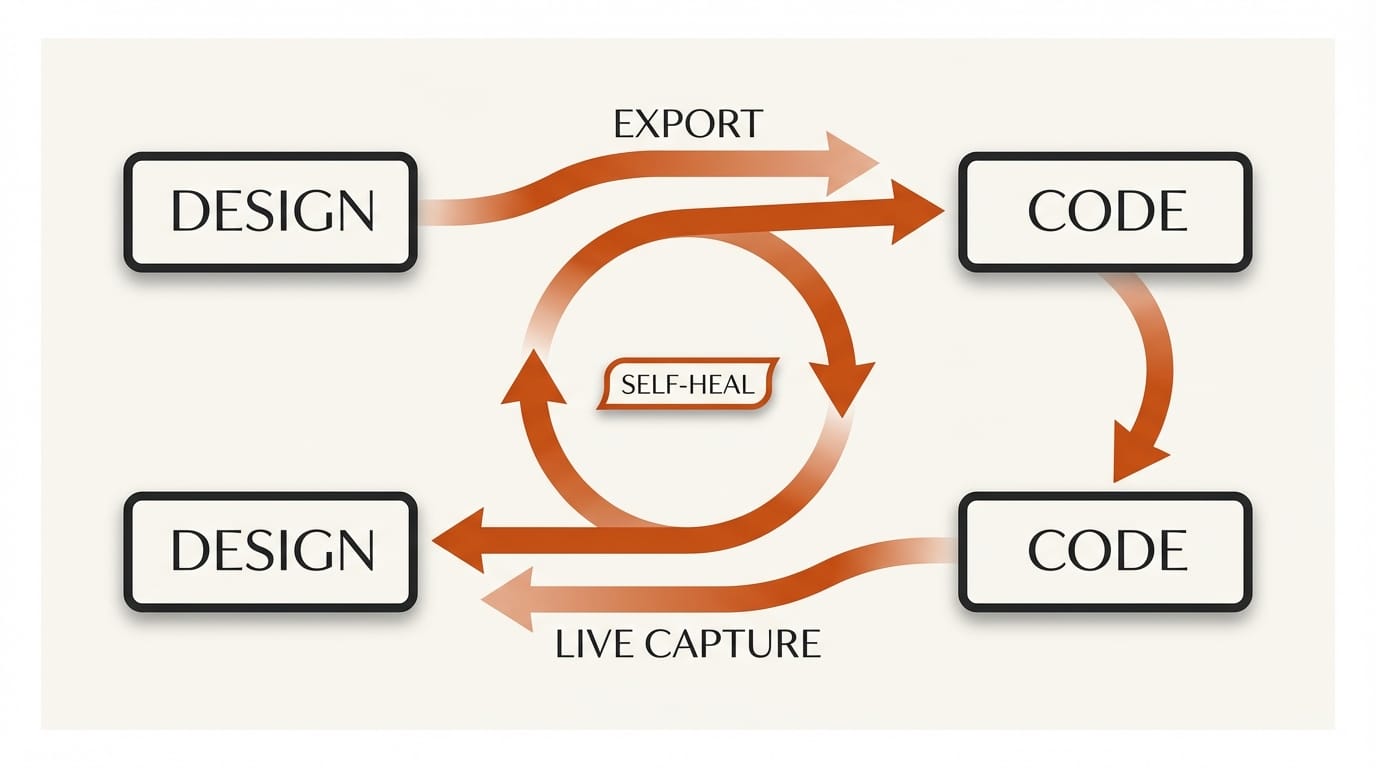
Two technical capabilities distinguish Figma's agent integration from simpler AI design tools. The self-healing loop lets agents screenshot their own output, compare it against the original intent, and correct mismatches automatically. Critically, corrections happen through variable and constraint adjustments, not pixel-level patching. If an agent generates a component with incorrect spacing, it adjusts the auto layout properties rather than nudging elements visually. This maintains the structural integrity that makes components reusable.
Live UI capture, currently exclusive to Claude Code and Codex, goes in the opposite direction. Agents can screenshot running interfaces from production environments or localhost, then convert those screenshots into editable Figma layers linked to the team's component library. This creates a round-trip workflow: code generates design, design refines visually, code implements the refinements. The design-to-code gap that has frustrated teams for decades collapses into a continuous loop mediated by agents.
Figma has not announced pricing for these features yet. Everything is free during the open beta. The remote MCP server is available on all plans, while the desktop MCP server requires a Dev or Full seat on paid plans. Usage-based pricing will follow, which means the cost of running agents on the canvas will eventually factor into team budgets alongside traditional seat costs.
Impact on Creators
For independent designers and small studios, this update redefines what a design system investment is worth. If you have been maintaining a clean, well-tokenized Figma library, your system just became dramatically more productive. Agents can now generate full component sets with 72-plus variants in a single session, inheriting your naming conventions, spacing scales, and color tokens automatically. The return on the hours spent organizing your design system just multiplied.
For design system teams at larger organizations, the role is shifting. You are no longer just building documentation for human designers. You are building infrastructure that AI agents consume programmatically. This means stricter naming conventions, more consistent token usage, and explicit variable definitions matter more than ever. As Figma's own analysis noted, teams with mature design systems will see useful results immediately, while teams with inconsistent systems will need to clean up before agents can work effectively.
The competitive pressure from Figma's State of Design 2026 report showed designers are split on AI's impact. This update may clarify the picture. AI is not replacing designers on the canvas. It is making the design system the most important asset a team owns, and the designers who maintain that system the most valuable people in the workflow.
Key Takeaways
1. Figma is positioning itself as the shared canvas for rival AI platforms rather than building its own AI generator, letting nine competing coding agents write to the same design surface.
2. Design systems have shifted from human documentation to machine-readable infrastructure. The quality of your design system directly determines the quality of AI agent output.
3. Uber's uSpec system proves the concept at enterprise scale, cutting multi-platform design spec documentation from weeks to under two minutes.
4. The Skills framework lets any team encode domain expertise as markdown files, creating a community-driven ecosystem of reusable agent behaviors without plugin development.
What to Watch
The next quarter will reveal whether Figma's agent-first strategy holds against Google Stitch's generation-first approach. Watch for usage-based pricing announcements, which will determine whether agent write access becomes a premium tier feature or remains broadly accessible. Track adoption of the Skills framework by design system teams, particularly whether enterprise organizations begin publishing internal skills as standard practice. The Figma developer documentation already provides the foundation for custom skills, and the community's response will determine whether this becomes a new category of design tooling or a niche feature used by early adopters. If major design systems (Material, Lightning, Polaris) publish official Figma skills, it will signal that the paradigm has shifted permanently.
Deep dive by Creative AI News.
Subscribe for free to get the weekly digest every Tuesday.